
Learn more about security best practices and protecting your API keys.
We provide several tools to help safeguard your API keys, strengthen your security posture, and protect potentially sensitive client information.
Follow this guide to learn more about security best practices, API key restrictions, request logging controls, and the security measures we take to protect our platform.
API Key Security
Because API keys are directly tied to your account and billing, it is important to protect them from unauthorized access and abuse.
We recommend following the security best practices below and enabling one or more of the API key restriction options available through your API dashboard.
Security Best Practices
The following recommendations will help keep your API keys secure and reduce the risk of unauthorized access:
- Keep API keys server-side: never expose API keys in client-side applications, mobile apps, browser extensions, or publicly accessible source code
- Store API keys securely: use environment variables or a secure secrets management solution instead of hard-coding keys in your application
- Use separate API keys for different contexts: create unique keys for production, staging, development, and individual applications to simplify management and troubleshooting
- Enable API key restrictions: restrict API keys to approved IP addresses or specific API endpoints whenever possible
- Rotate and revoke keys regularly: delete unused keys and immediately rotate any key that may have been exposed or compromised
- Limit access to trusted users and systems: do not share API keys through email, support tickets, screenshots, public repositories, or other insecure channels
- Monitor API usage: review your API usage patterns regularly on your API dashboard and investigate unexpected activity or usage spikes
IP Restrictions
IP restrictions allow you to limit an API key to specific IP addresses or IP address ranges. Only requests originating from approved IP addresses will be allowed to use that API key.
This feature is useful when API requests originate from a known set of servers, networks, cloud environments, or backend applications.
To configure IP restrictions, open the Security tab when creating or editing an API key and enable IP restrictions.
Next, enter one or more IPv4 or IPv6 addresses or IP address ranges that should be allowed to access our API using that key. When entering IP address ranges, use the CIDR notation to specify a group of IP addresses. See examples below:
- Single IPv4 address:
192.168.1.100 - Single IPv6 address:
2001:db8::1 - IPv4 CIDR range:
192.168.1.0/24 - IPv6 CIDR range:
2001:db8::/32
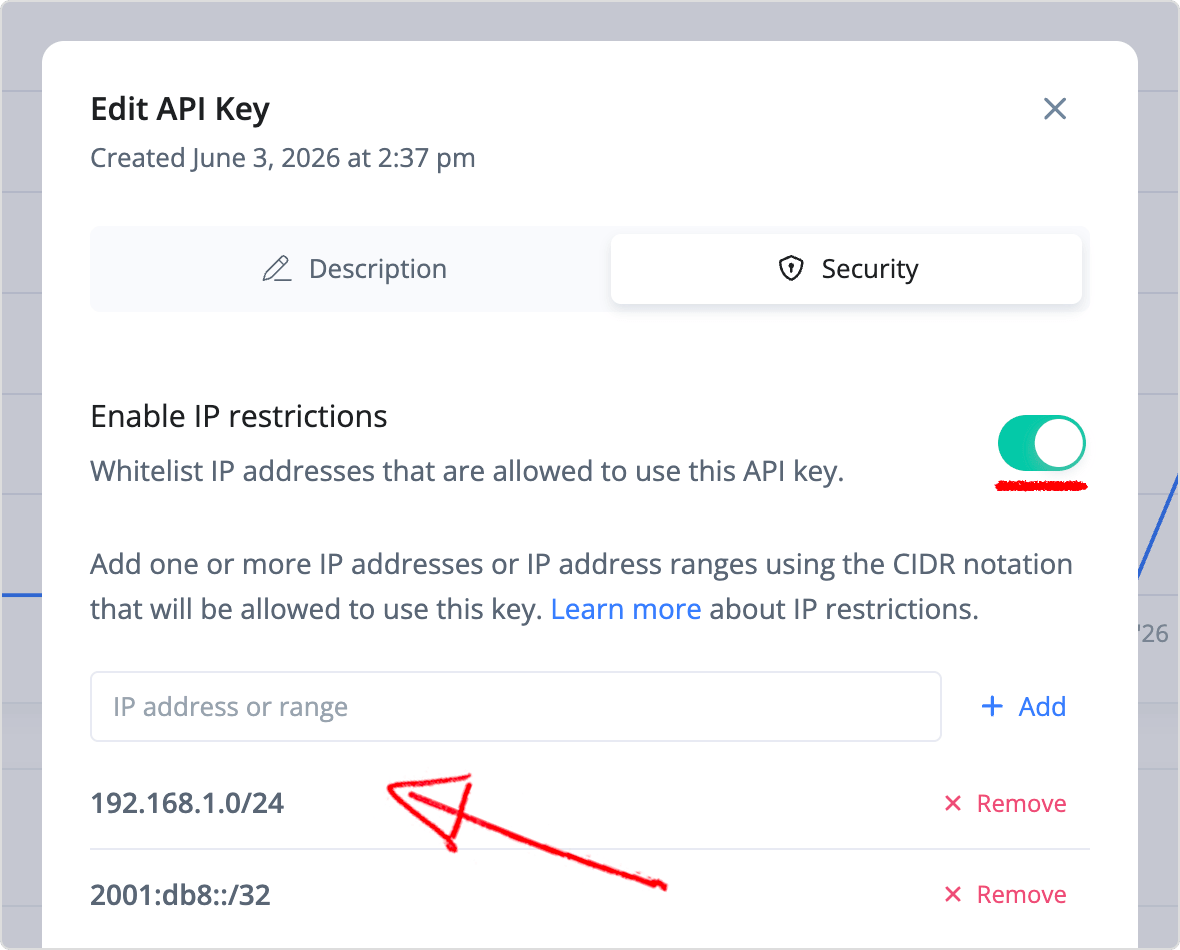
IP restrictions provide an additional layer of security, but they are not a substitute for keeping your API keys private. API keys should always be stored securely on the server and never exposed in client-side applications or public source code.
Endpoint Restrictions
Endpoint restrictions allow you to limit an API key to specific API endpoints.
This can help limit each key to only the API access it needs and reduce the impact of a compromised API key. For example, if an application only requires access to rental listings, you can create an API key that is restricted to those endpoints and cannot access any other endpoints.
To configure endpoint restrictions, open the Security tab when creating or editing an API key and enable endpoint restrictions. Next, select one or more API endpoints that key will be allowed to access:
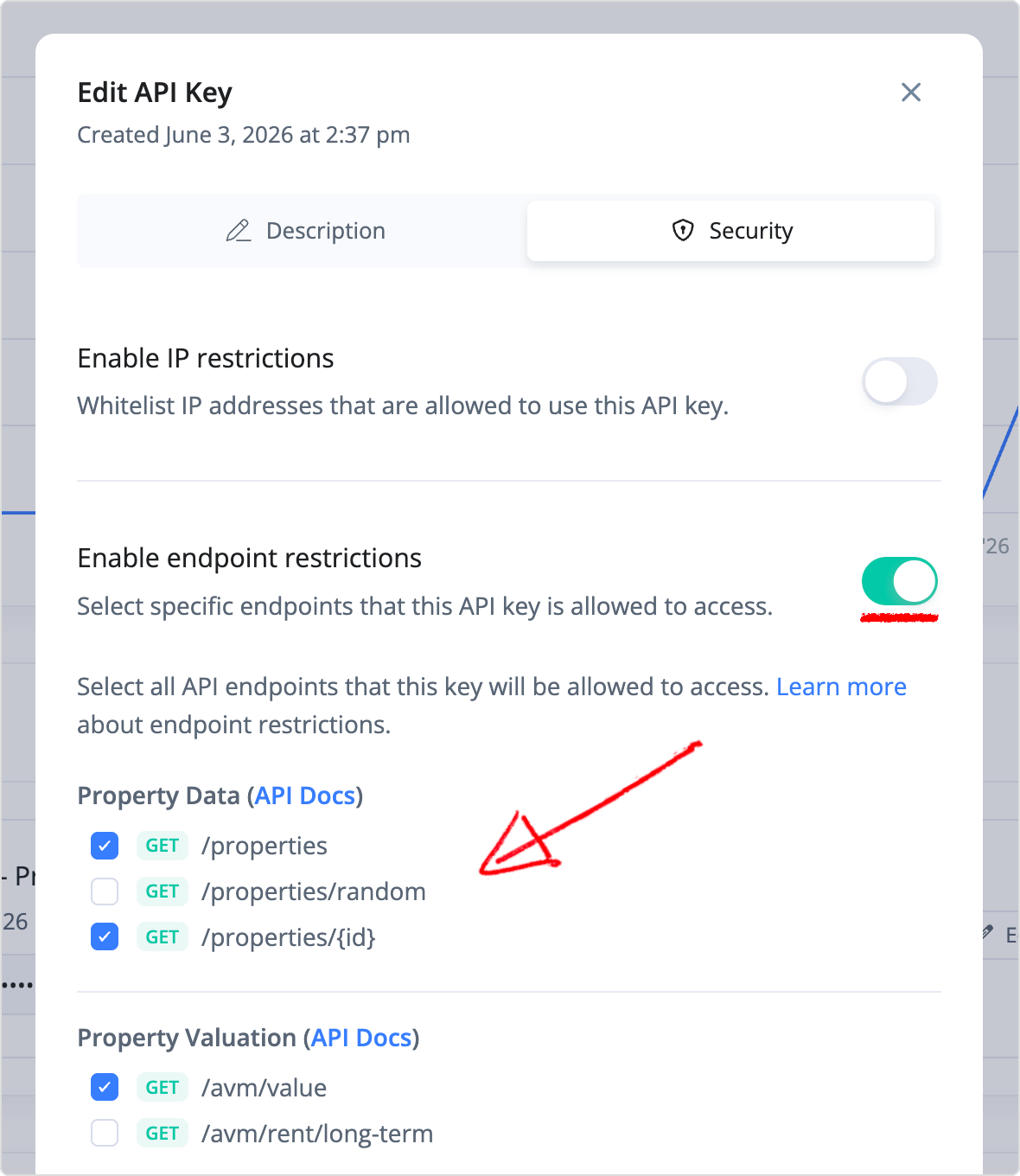
Endpoint restrictions work best when combined with IP restrictions. Using both features together can significantly reduce the scope and impact of a compromised API key.
Request Logging Suppression
By default, limited API request information may be temporarily logged within our internal systems to assist with operational monitoring, troubleshooting, abuse prevention, and platform reliability.
These logs may include request metadata and query parameters submitted as part of your API requests. Log data is temporary and is typically retained for no more than 60 days.
If your organization prefers that request parameters not be stored within our internal systems, you can disable request logging by providing the suppressLogging query parameter with a "true" value, as shown in the example below:
curl --request GET \
  --url 'https://api.rentcast.io/v1/properties?address=5500%20Grand%20Lake%20Dr%2C%20San%20Antonio%2C%20TX%2C%2078244&suppressLogging=true' \
  --header 'Accept: application/json' \
  --header 'X-Api-Key: YOUR_API_KEY'
When this is enabled, request parameters provided to our API server will not be stored in our internal request logs or associated with your RentCast account.
Infrastructure Security
We understand that security and privacy are important to our customers and follow industry-standard best practices when developing, operating, and maintaining our platform.
Our infrastructure is built on managed cloud services from established providers and incorporates multiple layers of security controls, including:
- Encryption of data in transit using HTTPS/TLS
- Encryption of data at rest using managed cloud provider encryption controls
- Restricted access to production systems and infrastructure
- Secure storage of credentials, API keys, and application secrets
- Regular software, operating system, and dependency updates
- Infrastructure monitoring and operational logging
- Use of managed service providers with established security and compliance programs
We use the following providers as part of our platform infrastructure. For additional information about their security and compliance programs, please refer to their trust and security centers below:
- Google Cloud Platform (cloud infrastructure)
- MongoDB Atlas (data storage)
- Stripe (billing and payment processing)
If you have any security-related questions or concerns, you can contact us via email, or use the live chat button at the bottom right of our website to speak with our team.